Process Management
Process: Instance of an executing program.
- State of execution
- program counter, stack pointer
- Parts and temporary holding area
- data, register state, occupies state in memory
- May require special hardware
- I/O devices
Process is a state of a program when executing and loaded in memory (active state) as opposed to application (static state).
What does a process look like?
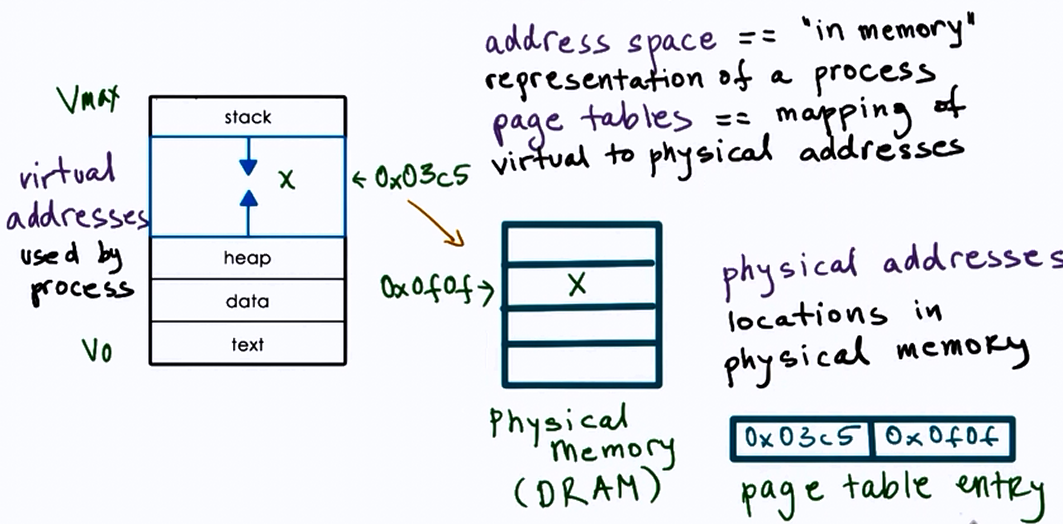
Type of state
- Text and Data
- static state when process loads first
- Heap
- dynamically created during execution
- Stack
- grows and shrinks
- LIFO queue (used to store task checkpoints to resume the original process after switching from another.)
How does the OS know what a process is doing?
- Program counter
- CPU registers
- Stack pointer
Process Control Block (PCB)
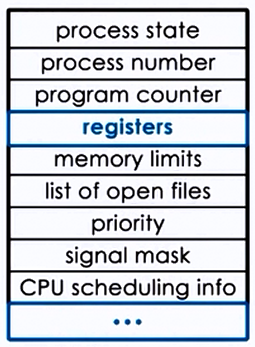
- PCB created when process is created
- Certain fields are updated when process state change e.g. memory mapping
- or other fields that change very frequently e.g. Program Counter
Process Lifecycle
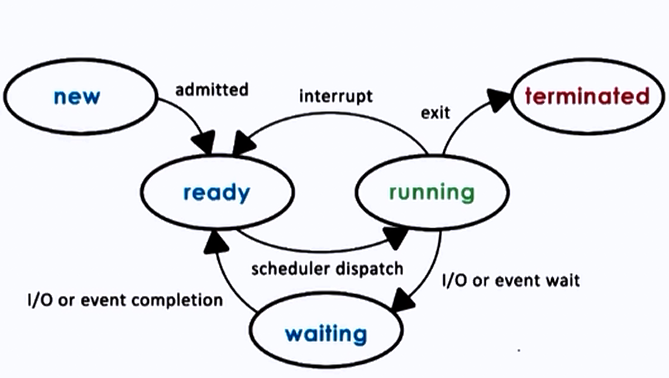
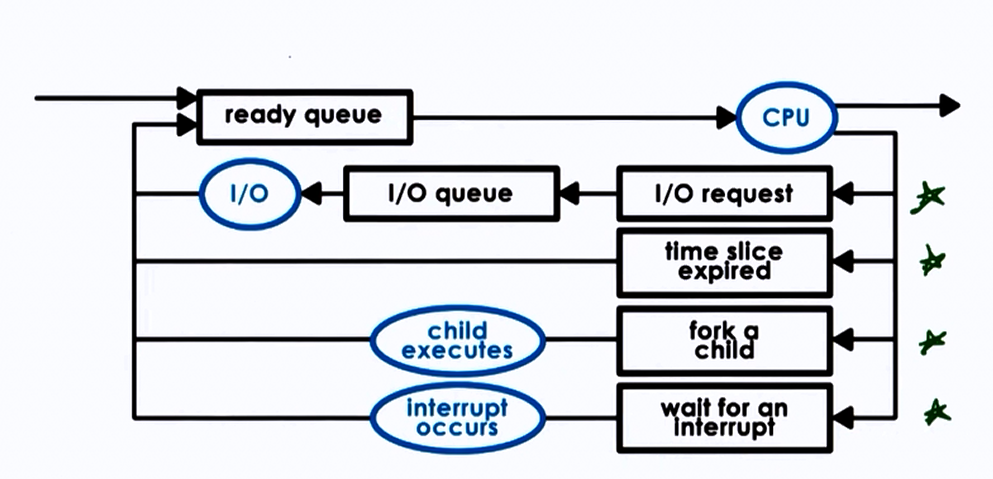
CPU is able to execute a process when the process is in Running or Ready state.
Process Creation
Mechanisms:
- fork :
- copies the parent PCB into new child PCB
- child contains execution at instruction after fork
- exec :
- replace child image
- load new program and start from first instruction
What is the role of CPU scheduler?
CPU scheduler determines which one of the currently ready processes will be dispatched to the CPU to start running, and how long it should run for.
OS must :
- preempt => interrupt and save current context
- schedule => run scheduler to choose next process
- dispatch => dispatch process 2 switch into its context
Scheduling design decisions
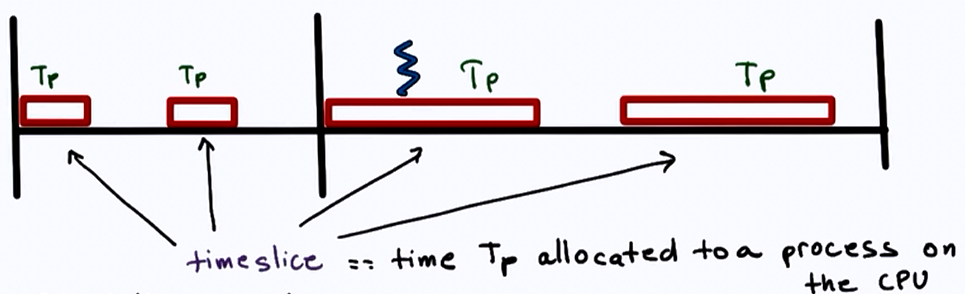
- What are the appropriate timeslice values?
- Metrics to choose next process to run?
I/O
A process can make way in the ready queue in a number of ways.
- OS establishes a shared channel and maps it into each processes’ address space
- Processes directly write(send), read(receive) msg to/from this memory
Threads and concurrency
Thread:
- is an active
- entity executing unit of a process
- works simultaneously with others
- many threads execute together
- requires coordination
- sharing of I/O devices, CPUs, memory
Process vs Thread
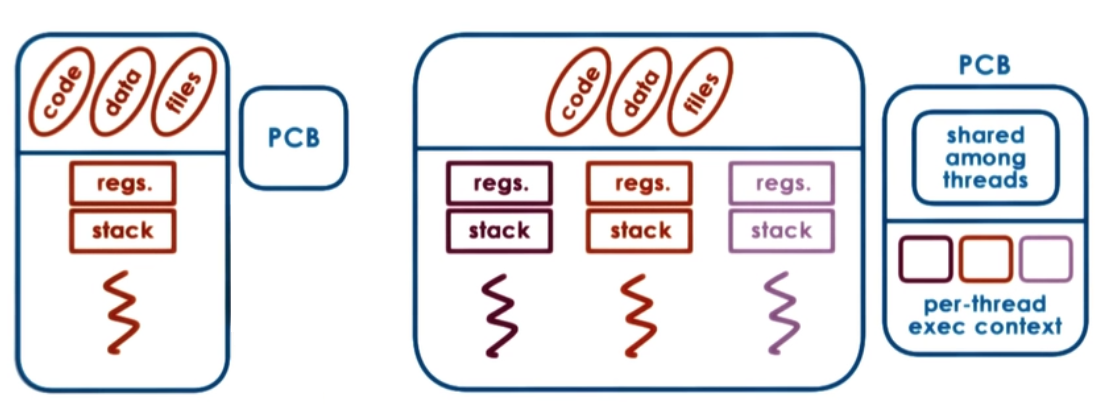
Why are threads useful?
- Parallelization => Speedup
- Specialization => Hot cache
- Efficiency => lower memory requirement & cheaper IPC
- Time for context switch in threads is less, since memory is shared, hence mapping is not required between virtual and physical memory.
- Therefore multithreading can be used to hide latency.
- Benefits to both applications and OS code
- Multithreaded OS kernel
- threads working on behalf of applications
- OS level services like daemons and drivers
- Multithreaded OS kernel
What do we need to support threads?
- Threads data structure
- Identify threads, keep track of resource usage..
- Mechanisms to create and manage threads
- Mechanisms to safely coordinate among threads running concurrently in the same address space
Concurrency control and Coordination
- Mutual exclusion
- Exclusive access to only one thread at a time
- mutex
- Waiting on other threads
- Specific condition before proceeding
- condition variable
- Waking up other threads from wait state
Threads and Threads creation
- Thread data structure:
- Thread type, Thread ID, PC, SP, registers, stack, attributes.
- Fork(proc, args)
- create a thread
- not UNIX fork
t1 = fork(proc, args)
- Join(thread)
- terminate a thread
child_result = join(t1)
GIT: Important Commands
git init: Initialize a new Git repository.
git clone [url]: Clone a repository from a URL.
git status: Show the working directory status.
git add [file]: Add file contents to the index (staging area).
git commit -m "[message]": Record changes to the repository with a message.
git push: Update remote references along with associated objects.
git pull: Fetch from and integrate with another repository or a local branch.
git fetch: Download objects and refs from another repository.
git branch: List, create, or delete branches.
git checkout [branch]: Switch branches or restore working tree files.
git merge [branch]: Join two or more development histories together.
git log: Show commit logs.
git diff: Show changes between commits, commit and working tree, etc.
git reset [commit]: Reset current HEAD to the specified state.
git rm [file]: Remove files from the working directory and the index.
git stash: Stash the changes in a dirty working directory away.
git tag [tagname]: Create a tag in the repository.
git remote: Manage set of tracked repositories.
git show [commit]: Show various types of objects.
git rebase [branch]: Reapply commits on top of another base tip.
git cherry-pick [commit]: Apply the changes introduced by some existing commits.
git blame [file]: Show what revision and author last modified each line of a file.
git archive: Create an archive of files from a named tree.
git bisect: Use binary search to find the commit that introduced a bug.
git submodule: Initialize, update, or inspect submodules.
CSS: What & Why BEM?
BEM (Block, Element, Modifier) is a methodology for writing CSS that helps create reusable and maintainable code. It stands for Block, Element, Modifier.
A Block represents a standalone entity that is meaningful on its own (e.g., menu). An Element is a part of a Block that has no standalone meaning and is semantically tied to its Block (e.g., menu__item).
A Modifier is a flag on a Block or Element that changes its appearance or behavior (e.g., menu–large, menu__item–active). This naming convention makes the structure of HTML and CSS more predictable and easier to read.
Why BEM over the others?
No matter what methodology you choose to use in your projects, you will benefit from the advantages of more structured CSS and UI. Some styles are less strict and more flexible, while others are easier to understand and adapt in a team.
Blocks, Elements and Modifiers
Block
Standalone entity that is meaningful on its own.
Examples
header, container, menu, checkbox, input
Element
A part of a block that has no standalone meaning and is semantically tied to its block.
Examples
menu item, list item, checkbox caption, header title
Modifier
A flag on a block or element. Use them to change appearance or behavior.
Examples
disabled, highlighted, checked, fixed, size big, color yellow
<button class="button">
	Normal button
</button>
<button class="button button--state-success">
	Success button
</button>
<button class="button button--state-danger">
	Danger button
</button>
.button {
	display: inline-block;
	border-radius: 3px;
	padding: 7px 12px;
	border: 1px solid #D5D5D5;
	background-image: linear-gradient(#EEE, #DDD);
	font: 700 13px/18px Helvetica, arial;
}
.button--state-success {
	color: #FFF;
	background: #569E3D linear-gradient(#79D858, #569E3D) repeat-x;
	border-color: #4A993E;
}
.button--state-danger {
	color: #900;
}
Benefits
Modularity: Block styles are never dependent on other elements on a page, so you will never experience problems from cascading. You also get the ability to transfer blocks from your finished projects to new ones.
Reusability: Composing independent blocks in different ways, and reusing them intelligently, reduces the amount of CSS code that you will have to maintain. With a set of style guidelines in place, you can build a library of blocks, making your CSS super effective.
Structure: BEM methodology gives your CSS code a solid structure that remains simple and easy to understand.
What is SASS?
Sass (Syntactically Awesome Stylesheets) is a CSS preprocessor that adds power and elegance to the basic language, allowing for more dynamic and reusable stylesheets. It introduces features like variables, nested rules, mixins, inheritance, and functions, making it easier to manage and scale CSS code for large projects.
Key Features of Sass:
Variables: Store values like colors, fonts, or any CSS value for reuse.
$primary-color: #333;
body {
color: $primary-color;
}
Nesting: Nest CSS selectors in a way that follows the same visual hierarchy of HTML.
nav {
ul {
margin: 0;
padding: 0;
list-style: none;
}
li { display: inline-block; }
a {
text-decoration: none;
&:hover { text-decoration: underline; }
}
}
Partials and Import: Split CSS into smaller, manageable files.
// _base.scss
body {
font-family: Arial, sans-serif;
}
// main.scss
@import 'base';
Mixins: Create reusable blocks of styles.
@mixin border-radius($radius) {
-webkit-border-radius: $radius;
-moz-border-radius: $radius;
border-radius: $radius;
}
.box { @include border-radius(10px); }
Inheritance: Share a set of CSS properties from one selector to another.
.message { border: 1px solid #ccc; padding: 10px; color: #333; }
.success { @extend .message; border-color: green; }
.error { @extend .message; border-color: red; }
Functions: Define custom functions for calculations.
@function divide($a, $b) {
@return $a / $b * 1%;
}
.container { width: divide(960, 12); }
What is CRON?
CRON is a time-based job scheduler in Unix-like operating systems. It is used to automate the execution of tasks (scripts or commands) at specified times and intervals. These tasks, referred to as “cron jobs,” can be scheduled to run periodically at fixed times, dates, or intervals.
Key Features of CRON:
- Automation: Automatically executes tasks without user intervention.
- Flexibility: Schedule tasks to run at almost any time and interval (e.g., every minute, hourly, daily, weekly, monthly).
- Simplicity: Uses a simple syntax for specifying the schedule.
CRON Syntax:
A cron schedule is composed of five fields, followed by the command to be executed:
* * * * * command-to-be-executed
│ │ │ │ │
│ │ │ │ └───── Day of the week (0-7) (Sunday=0 or 7)
│ │ │ └────────── Month (1-12)
│ │ └─────────────── Day of the month (1-31)
│ └──────────────────── Hour (0-23)
└───────────────────────── Minute (0-59)
Examples:
- Run a command every day at 2:30 AM
30 2 * * * /path/to/command- Run a script every Monday at 5:00 PM:
0 17 * * 1 /path/to/script.shGH Assignment: Implementing Database class
<?php
namespace App;

final class Database
{
	private $connection;
	private $servername = "localhost";
	private $username = "root";
	private $password = "root";
	private $dbname = "local";
	public function __construct($servername = "localhost", $username = "root",  $password ="root", $dbname = "local")
	{
		$this->servername = $servername;
		$this->username = $username;
		$this->password = $password;
		$this->dbname = $dbname;
		$this->connection = new \mysqli($this->servername, $this->username, $this->password, $this->dbname);
	}
	public function getConnection()
	{
		if ($this->connection) {
			return $this->connection;
		} else {
			$this->connection = new \mysqli($this->servername, $this->username, $this->password, $this->dbname);
			return $this->connection;
		}
	}
	public function disconnect()
	{
		return $this->connection->close();
	}
	public function checkTableExist($table)
	{
		$sql = "SELECT COUNT(*) AS count FROM information_schema.tables WHERE table_schema = '$this->dbname' AND table_name = '$table'";
		$result = $this->connection->query($sql);

		if ($result->num_rows > 0) {
			$row = $result->fetch_assoc();
			if ($row['count'] > 0) {
				//echo "Table '$table' exists.";
				return true;
			} else {
				//echo "Table '$table' does not exist.";
				return false;
			}
		} else {
			echo "Error checking table existence: " . $this->connection->error;
		}
		return true;
	}
}
We have implemented a singleton method for database class, which provides a wrapper to do database operations. We can however futher improve this class by adding predefined methods, adding env-vars & inheritance.
GH: Simple Error Logger built via PHP
<?php
class Error {
		public static function log($code, $message, $details = null){
		  $file = 	fopen("log.txt", "w");
		  $data = [
				$code => $message,
				'error' => $details,
				'timestamp' => time()
			];
		  fwrite($file, json_encode($data));
		  fclose($file);
		}
}

Error::log("404", "test run");

?>
This allows user to statically call it and log errors into a file.
Thank you for reading~
Leaveitblank (Mayank Tripathi)