Readme CheckList:
- There’s a development environment at branch develop.
- Follow Coding Standards and Best Practices.
- The skeleton guide has a brief about the structure.
- No PHPCS feedback on PRs.
- Use a custom autoloader.
- Correctly apply sanitization and escaping.
- Follow OOP principles.
- Add inline documentation, autoloading and namespaces.
- Focus on logical reasoning and optimal solutions.
- Avoid feedback on architecture and personal preferences.
- Write up a good descriptive PR Title and Desc.
SKELETON CheckList:
|-- .github
|   |-- hosts.yml
|   `-- workflows
|       |-- deploy_on_push.yml
|       `-- phpcs_on_pull_request.yml
|
|-- .gitignore
|
|-- README.md
|-- SKELETON-GUIDE.md
|
|-- mu-plugins
|   |-- plugin-update-notification.php
|
|-- phpcs.xml
|
|-- plugins
|   `-- .gitkeep
|
|-- rt-config
|   `-- rt-config.php
|
`-- themes
|   `-- .gitkeep
|
|-- webroot-files
|   `-- .gitkeep
phpcs.xml
- PHPCS default ruleset configuration.
rt-config
- rt-config.php: Similar to
wp-config.php, loaded early in the process.
mu-plugins
- plugin-update-notification.php: Notifies about plugin updates when
DISALLOW_FILE_MODSis true.
plugins
- Folder for WordPress plugins.
themes
- Folder for WordPress themes.
webroot-files
- Folder for webroot files.
Development.md CheckList
Branch Naming Convention
- Bug:
fix/issue-name(e.g.,fix/phpcs-errors) - Feature:
feature/issue-name(e.g.,feature/add-plugin)
Pull Request and Issue Notes
- PR title: Use issue title with issue number if fixing a single issue (e.g.,
GH-3 Setup initial theme) or if it fixes multiple issues than use tag name like (Basic Plugin Assignment) - Description: Add proper description.
- Reviewer: Assign a reviewer.
- Approval: One approval required.
WordPress Development Basics
Prerequisite: Update phpcs.xml and add domain for website in it.
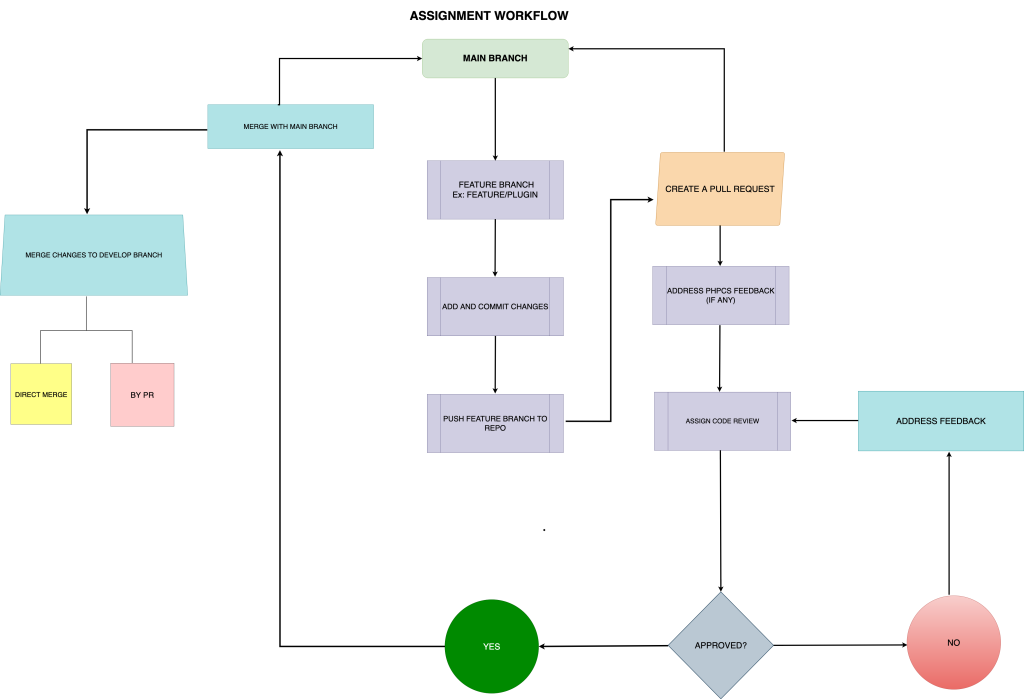
- Create and push a feature/plugin branch from the main branch.
- Work on the feature/plugin branch for the plugin assignment tasks, pushing changes regularly.
- Upon completion, raise a pull request against the main branch following the Pull Request and issue notes guidelines.
- PHPCS scan will run and provide feedback if any.
- Address PHPCS feedback and request a code review.
- If unsure about the code reviewer, ask the L&D team or trainer.
- Address any requested changes in the same branch, push updates, and re-request a review.
- Once approved, merge the pull request into the main branch.
Recommended Project Structure
Plugin:
In inc/traits/trait-singleton.php, define a singleton trait to enable the use of a single instance for any class by calling ClassName::get_instance().
├── plugin.php
└── inc
    ├── classes
    │    └── class-plugin.php
    │    └── <other_classes_maybe_in_subfolders>
    ├── helpers
    │    └── autoloader.php
    └── traits
        └── trait-singleton.php
In plugin.php, which serves as the entry point of the plugin, you should:
- Define any necessary constants, such as the plugin path.
- Require the
inc/helpers/autoloader.phpfile. - Initialize all other classes in
inc/classes/class-plugin.php.
For deployment, you can merge your feature/fix branch to
developbranch. After pushing changes todevelopbranch, It will be deployed to development site at tr.rt.gw
Plugin Basics Assignment:
- Register Custom Post Types and Taxonomies #1
- add following post types [rt-movie, rt-person]
- add following hierarchical taxonomies [rt-movie-genre, rt-movie-label, rt-movie-language, rt-movie-production-company, rt-person-career]
- add following non-hierarchical taxonomies [rt-movie-tag, _rt-movie-person]
- Register Custom Meta Box Movie Post Type Metadata #2
- add following metabox for movie [rt-movie-meta-basic].
- Rating (
rt-movie-meta-basic-rating) - Runtime (
rt-movie-meta-basic-runtime) - Release Date (
rt-movie-meta-basic-release-date) - Content Rating (
rt-movie-meta-basic-content-rating)
- Rating (
- add following custom meta box for
Crewinformation (rt-movie-meta-crew).- Director (
rt-movie-meta-crew-director) - Producer (
rt-movie-meta-crew-producer) - Writer (
rt-movie-meta-crew-writer) - Actor/Star (
rt-movie-meta-crew-actor)
- Director (
- Create terms (if not exists) of “person” shadow/utility taxonomy using Post ID of “Person” post type and assign it to movie post.
- add following metabox for movie [rt-movie-meta-basic].
- Register Custom Meta Box Person Post Type Metadata #3
- custom meta box for following
Basicmetadata(rt-person-meta-basic).- Full Name (
rt-person-meta-full-name) - Birth Date (
rt-person-meta-basic-birth-date) - Birth Place (
rt-person-meta-basic-birth-place) - Social Information (
rt-person-meta-social)- Twitter (
rt-person-meta-social-twitter) - Facebook (
rt-person-meta-social-facebook) - Instagram (
rt-person-meta-social-instagram) - Website (
rt-person-meta-social-web)
- Twitter (
- Full Name (
- custom meta box for following
- Register Custom Meta Box for Photo and Video Gallery #17
- add separate meta box for photo (
rt-media-meta-img) and video (rt-media-meta-video) gallery.- Register these meta boxes for
MovieandPersonpost types. - Use wp.media to display media modal to select media
- Save only attachment IDs in post meta with
rt-media-meta-imgandrt-media-meta-videokeys
- Register these meta boxes for
- meta box for a landscaped poster(
rt-movie-meta-carousel-poster) for theMoviepost type.- Again, save only the attachment ID.
- Use
wp.mediato display modal to select a single image attachment.
- add separate meta box for photo (
- Register Shortcodes #4
- Register
[movie]shortcode.- Shortcode attributes to filter movie posts.
- person – It could be slug/name (Shadow Taxonomy)
- genre – It could be term id/slug/name
- label – It could be term id/slug/name
- language – It could be term id/slug/name
- Shortcode attributes to filter movie posts.
- Register
[person]shortcode.- Shortcode attributes to filter persons posts.
- career – It could be term id/slug/name
- Register
- Register Settings Page #5
- Add options page under
Settingsmenu- Delete all content on plugin delete.
- Add warning as description of this option for user to tell that this will delete all the content.
- add a checkbox and If user checked this option and if user delete plugin, then delete all posts & metadata of movies and persons post types. [for now just checkbox required]
- Delete all content on plugin delete.
- Add options page under
Thanks for reading…
By ~Leaveitblank(Mayank Tripathi)