What is MySQL?
- MySQL is a database system used on the web
- MySQL is a database system that runs on a server
- MySQL is ideal for both small and large applications
- MySQL is very fast, reliable, and easy to use
- MySQL uses standard SQL.
PHP 5 and later can work with a MySQL database using:
- MySQLi extension (the “i” stands for improved)
- PDO (PHP Data Objects)
MySQLi extension: How to connect?
<?php
$servername = "localhost";
$username = "username";
$password = "password";

// Create connection
$conn = new mysqli($servername, $username, $password);

// Check connection
if ($conn->connect_error) {
  die("Connection failed: " . $conn->connect_error);
}
echo "Connected successfully";
?>
Create a MySQL Database
The CREATE DATABASE statement is used to create a new SQL database.
CREATE DATABASE databasename;
Ex: Mysqli OOP way
<?php
$servername = "localhost";
$username = "username";
$password = "password";

// Create connection
$conn = new mysqli($servername, $username, $password);
// Check connection
if ($conn->connect_error) {
  die("Connection failed: " . $conn->connect_error);
}

// Create database
$sql = "CREATE DATABASE myDB";
if ($conn->query($sql) === TRUE) {
  echo "Database created successfully";
} else {
  echo "Error creating database: " . $conn->error;
}

$conn->close();
?>
Drop Database: The DROP DATABASE statement is used to drop an existing SQL database.
DROP DATABASE databasename;
Create: The CREATE TABLE statement is used to create a new table in a database.
CREATE TABLE table_name (
column1 datatype,
column2 datatype,
column3 datatype,
….
);
Drop: The DROP TABLE statement is used to drop an existing table in a database.
DROP TABLE table_name;
Alter: The ALTER TABLE statement is used to add, delete, or modify columns in an existing table. The ALTER TABLE statement is also used to add and drop various constraints on an existing table.
ALTER TABLE table_name
ADD column_name datatype;
ALTER TABLE table_name
MODIFY COLUMN column_name datatype;
MySQL: Concepts
Create Constraints:
Constraints are used to limit the type of data that can go into a table. This ensures the accuracy and reliability of the data in the table. If there is any violation between the constraint and the data action, the action is aborted.
The following constraints are commonly used in SQL:
NOT NULL– Ensures that a column cannot have a NULL valueUNIQUE– Ensures that all values in a column are differentPRIMARY KEY– A combination of aNOT NULLandUNIQUE. Uniquely identifies each row in a tableFOREIGN KEY– Prevents actions that would destroy links between tablesCHECK– Ensures that the values in a column satisfies a specific conditionDEFAULT– Sets a default value for a column if no value is specifiedCREATE INDEX– Used to create and retrieve data from the database very quickly
What is an AUTO INCREMENT Field?
Auto-increment allows a unique number to be generated automatically when a new record is inserted into a table. Often this is the primary key field that we would like to be created automatically every time a new record is inserted.
MySQL uses the AUTO_INCREMENT keyword to perform an auto-increment feature. By default, the starting value for AUTO_INCREMENT is 1, and it will increment by 1 for each new record.
CREATE TABLE Persons (
Personid int NOT NULL AUTO_INCREMENT,
LastName varchar(255) NOT NULL,
FirstName varchar(255),
Age int,
PRIMARY KEY (Personid)
);
To let the AUTO_INCREMENT sequence start with another value, use the following SQL statement:
ALTER TABLE Persons AUTO_INCREMENT=100;
MySQL Date Data Types
MySQL comes with the following data types for storing a date or a date/time value in the database:
DATE– format YYYY-MM-DDDATETIME– format: YYYY-MM-DD HH:MI:SSTIMESTAMP– format: YYYY-MM-DD HH:MI:SSYEAR– format YYYY or YY
SELECT * FROM Orders WHERE OrderDate='2008-11-11'
MySQL CREATE VIEW Statement
In SQL, a view is a virtual table based on the result-set of an SQL statement.
A view contains rows and columns, just like a real table. The fields in a view are fields from one or more real tables in the database.
CREATE VIEW view_name AS
SELECT column1, column2, …
FROM table_name
WHERE condition;
CREATE VIEW [Products Above Average Price] AS
SELECT ProductName, Price
FROM Products
WHERE Price > (SELECT AVG(Price) FROM Products);
MySQL Data Types (Version 8.0)
String DataTypes:
| Data type | Description |
|---|---|
| CHAR(size) | A FIXED length string (can contain letters, numbers, and special characters). The size parameter specifies the column length in characters – can be from 0 to 255. Default is 1 |
| VARCHAR(size) | A VARIABLE length string (can contain letters, numbers, and special characters). The size parameter specifies the maximum column length in characters – can be from 0 to 65535 |
| BINARY(size) | Equal to CHAR(), but stores binary byte strings. The size parameter specifies the column length in bytes. Default is 1 |
| VARBINARY(size) | Equal to VARCHAR(), but stores binary byte strings. The size parameter specifies the maximum column length in bytes. |
| TINYBLOB | For BLOBs (Binary Large OBjects). Max length: 255 bytes |
| TINYTEXT | Holds a string with a maximum length of 255 characters |
| TEXT(size) | Holds a string with a maximum length of 65,535 bytes |
| BLOB(size) | For BLOBs (Binary Large OBjects). Holds up to 65,535 bytes of data |
| MEDIUMTEXT | Holds a string with a maximum length of 16,777,215 characters |
| MEDIUMBLOB | For BLOBs (Binary Large OBjects). Holds up to 16,777,215 bytes of data |
| LONGTEXT | Holds a string with a maximum length of 4,294,967,295 characters |
| LONGBLOB | For BLOBs (Binary Large OBjects). Holds up to 4,294,967,295 bytes of data |
| ENUM(val1, val2, val3, …) | A string object that can have only one value, chosen from a list of possible values. You can list up to 65535 values in an ENUM list. If a value is inserted that is not in the list, a blank value will be inserted. The values are sorted in the order you enter them |
| SET(val1, val2, val3, …) | A string object that can have 0 or more values, chosen from a list of possible values. You can list up to 64 values in a SET list |
Numeric Data Types
| Data type | Description |
|---|---|
| BIT(size) | A bit-value type. The number of bits per value is specified in size. The size parameter can hold a value from 1 to 64. The default value for size is 1. |
| TINYINT(size) | A very small integer. Signed range is from -128 to 127. Unsigned range is from 0 to 255. The size parameter specifies the maximum display width (which is 255) |
| BOOL | Zero is considered as false, nonzero values are considered as true. |
| BOOLEAN | Equal to BOOL |
| SMALLINT(size) | A small integer. Signed range is from -32768 to 32767. Unsigned range is from 0 to 65535. The size parameter specifies the maximum display width (which is 255) |
| MEDIUMINT(size) | A medium integer. Signed range is from -8388608 to 8388607. Unsigned range is from 0 to 16777215. The size parameter specifies the maximum display width (which is 255) |
| INT(size) | A medium integer. Signed range is from -2147483648 to 2147483647. Unsigned range is from 0 to 4294967295. The size parameter specifies the maximum display width (which is 255) |
| INTEGER(size) | Equal to INT(size) |
| BIGINT(size) | A large integer. Signed range is from -9223372036854775808 to 9223372036854775807. Unsigned range is from 0 to 18446744073709551615. The size parameter specifies the maximum display width (which is 255) |
| FLOAT(size, d) | A floating point number. The total number of digits is specified in size. The number of digits after the decimal point is specified in the d parameter. This syntax is deprecated in MySQL 8.0.17, and it will be removed in future MySQL versions |
| FLOAT(p) | A floating point number. MySQL uses the p value to determine whether to use FLOAT or DOUBLE for the resulting data type. If p is from 0 to 24, the data type becomes FLOAT(). If p is from 25 to 53, the data type becomes DOUBLE() |
| DOUBLE(size, d) | A normal-size floating point number. The total number of digits is specified in size. The number of digits after the decimal point is specified in the d parameter |
| DOUBLE PRECISION(size, d) | |
| DECIMAL(size, d) | An exact fixed-point number. The total number of digits is specified in size. The number of digits after the decimal point is specified in the d parameter. The maximum number for size is 65. The maximum number for d is 30. The default value for size is 10. The default value for d is 0. |
| DEC(size, d) | Equal to DECIMAL(size,d) |
Date and Time Data Types
| Data type | Description |
|---|---|
| DATE | A date. Format: YYYY-MM-DD. The supported range is from ‘1000-01-01’ to ‘9999-12-31’ |
| DATETIME(fsp) | A date and time combination. Format: YYYY-MM-DD hh:mm:ss. The supported range is from ‘1000-01-01 00:00:00’ to ‘9999-12-31 23:59:59’. Adding DEFAULT and ON UPDATE in the column definition to get automatic initialization and updating to the current date and time |
| TIMESTAMP(fsp) | A timestamp. TIMESTAMP values are stored as the number of seconds since the Unix epoch (‘1970-01-01 00:00:00’ UTC). Format: YYYY-MM-DD hh:mm:ss. The supported range is from ‘1970-01-01 00:00:01’ UTC to ‘2038-01-09 03:14:07’ UTC. Automatic initialization and updating to the current date and time can be specified using DEFAULT CURRENT_TIMESTAMP and ON UPDATE CURRENT_TIMESTAMP in the column definition |
| TIME(fsp) | A time. Format: hh:mm:ss. The supported range is from ‘-838:59:59’ to ‘838:59:59’ |
| YEAR | A year in four-digit format. Values allowed in four-digit format: 1901 to 2155, and 0000. MySQL 8.0 does not support year in two-digit format. |
MySQL String Functions
| LOWER | Converts a string to lower-case |
| LPAD | Left-pads a string with another string, to a certain length |
| LTRIM | Removes leading spaces from a string |
| MID | Extracts a substring from a string (starting at any position) |
| POSITION | Returns the position of the first occurrence of a substring in a string |
| REPEAT | Repeats a string as many times as specified |
| SUBSTRING | Extracts a substring from a string (starting at any position) |
| SUBSTRING_INDEX | Returns a substring of a string before a specified number of delimiter occurs |
| TRIM | Removes leading and trailing spaces from a string |
| UCASE | Converts a string to upper-case |
| UPPER | Converts a string to upper-case |
What is PRIMARY KEY?
The PRIMARY KEY constraint uniquely identifies each record in a table. Primary keys must contain UNIQUE values, and cannot contain NULL values.
What is FOREIGN KEY?
The FOREIGN KEY constraint is used to prevent actions that would destroy links between tables. A FOREIGN KEY is a field (or collection of fields) in one table, that refers to the PRIMARY KEY in another table.
INSERT INTO Syntax
It is possible to write the INSERT INTO statement in two ways: Specify both the column names and the values to be inserted:
// Type 1
INSERT INTO table_name (column1, column2, column3, …)
VALUES (value1, value2, value3, …);// Type 2
INSERT INTO table_name
VALUES (value1, value2, value3, …);
What are prepared Statements?
A prepared statement is a feature used to execute the same (or similar) SQL statements repeatedly with high efficiency.
Prepared statements basically work like this:
- Prepare: An SQL statement template is created and sent to the database. Certain values are left unspecified, called parameters (labeled “?”). Example: INSERT INTO MyGuests VALUES(?, ?, ?)
- The database parses, compiles, and performs query optimization on the SQL statement template, and stores the result without executing it
- Execute: At a later time, the application binds the values to the parameters, and the database executes the statement. The application may execute the statement as many times as it wants with different values
Advantages:-
- Prepared statements reduce parsing time as the preparation on the query is done only once (although the statement is executed multiple times)
- Bound parameters minimize bandwidth to the server as you need send only the parameters each time, and not the whole query
- Prepared statements are very useful against SQL injections, because parameter values, which are transmitted later using a different protocol, need not be correctly escaped. If the original statement template is not derived from external input, SQL injection cannot occur.
<?php
$servername = "localhost";
$username = "username";
$password = "password";
$dbname = "myDB";

// Create connection
$conn = new mysqli($servername, $username, $password, $dbname);

// Check connection
if ($conn->connect_error) {
  die("Connection failed: " . $conn->connect_error);
}

// prepare and bind
$stmt = $conn->prepare("INSERT INTO MyGuests (firstname, lastname, email) VALUES (?, ?, ?)");
$stmt->bind_param("sss", $firstname, $lastname, $email);

// set parameters and execute
$firstname = "John";
$lastname = "Doe";
$email = "john@example.com";
$stmt->execute();

$firstname = "Mary";
$lastname = "Moe";
$email = "mary@example.com";
$stmt->execute();

$firstname = "Julie";
$lastname = "Dooley";
$email = "julie@example.com";
$stmt->execute();

echo "New records created successfully";

$stmt->close();
$conn->close();
?>
JOINS: RIGHT, LEFT, INNER
A JOIN clause is used to combine rows from two or more tables, based on a related column between them.
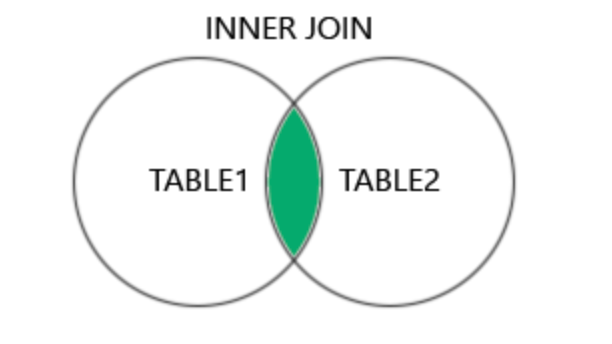
The INNER JOIN keyword selects records that have matching values in both tables.
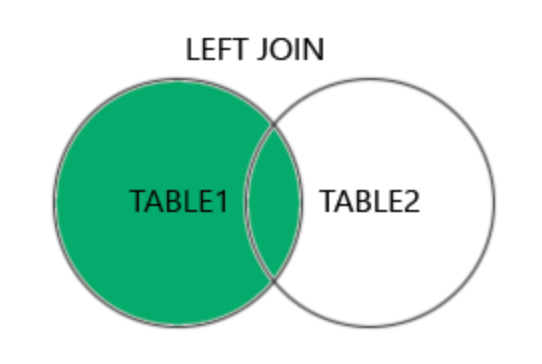
The LEFT JOIN keyword returns all records from the left table (table1), and the matching records (if any) from the right table (table2).
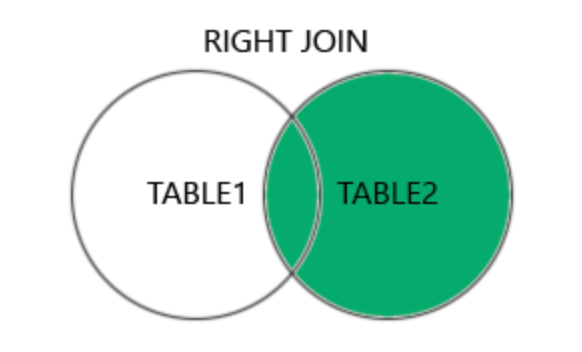
The RIGHT JOIN keyword returns all records from the right table (table2), and the matching records (if any) from the left table (table1).
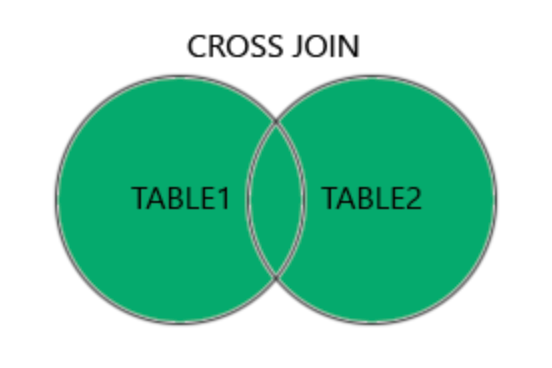
The CROSS JOIN keyword returns all records from both tables (table1 and table2).
A self join is a regular join, but the table is joined with itself.
SELECT column_name(s)
FROM table1 T1, table1 T2
WHERE condition;
Examples:
//Inner
SELECT column_name(s)
FROM table1
INNER JOIN table2
ON table1.column_name = table2.column_name;

// LEFT
SELECT column_name(s)
FROM table1
LEFT JOIN table2
ON table1.column_name = table2.column_name;

//Right
SELECT column_name(s)
FROM table1
RIGHT JOIN table2
ON table1.column_name = table2.column_name;

//Cross
SELECT column_name(s)
FROM table1
CROSS JOIN table2;
WHERE Clause
The WHERE clause is used to filter records.
The WHERE clause can be combined with AND, OR, and NOT operators.
The AND and OR operators are used to filter records based on more than one condition:
- The
ANDoperator displays a record if all the conditions separated byANDare TRUE. - The
ORoperator displays a record if any of the conditions separated byORis TRUE.
The NOT operator displays a record if the condition(s) is NOT TRUE.
SELECT column1, column2, …
FROM table_name
WHERE condition;SELECT column1, column2, …
FROM table_name
WHERE condition1 OR condition2 OR condition3 …;
ORDER BY Keyword
The ORDER BY keyword is used to sort the result-set in ascending or descending order.
The ORDER BY keyword sorts the records in ascending order by default. To sort the records in descending order, use the DESC keyword.
SELECT column1, column2, …
FROM table_name
ORDER BY column1, column2, … ASC|DESC;
GROUP BY Statement
The GROUP BY statement groups rows that have the same values into summary rows, like “find the number of customers in each country”.
The GROUP BY statement is often used with aggregate functions (COUNT(), MAX(), MIN(), SUM(), AVG()) to group the result-set by one or more columns
SELECT column_name(s)
FROM table_name
WHERE condition
GROUP BY column_name(s)
ORDER BY column_name(s);
CASE Statement
The CASE statement goes through conditions and returns a value when the first condition is met (like an if-then-else statement). So, once a condition is true, it will stop reading and return the result. If no conditions are true, it returns the value in the ELSE clause.
If there is no ELSE part and no conditions are true, it returns NULL.
CASE Syntax
CASE
WHEN condition1 THEN result1
WHEN condition2 THEN result2
WHEN conditionN THEN resultN
ELSE result
END;
SELECT OrderID, Quantity,
CASE
    WHEN Quantity > 30 THEN 'The quantity is greater than 30'
    WHEN Quantity = 30 THEN 'The quantity is 30'
    ELSE 'The quantity is under 30'
END AS QuantityText
FROM OrderDetails;
CSS: Cascading Style Sheets
What is CSS?
- CSS stands for Cascading Style Sheets
- CSS describes how HTML elements are to be displayed on screen, paper, or in other media
- CSS saves a lot of work. It can control the layout of multiple web pages all at once
- External stylesheets are stored in CSS files
p {
color: red;
text-align: center;
}
Why CSS?
Separates structure (HTML) from presentation (CSS), making websites more flexible and easier to maintain.
Notes:
| Topic | Description |
|---|---|
| Selector Types | Different types of selectors: element, class, ID, attribute, pseudo-class |
| Box Model | Understanding content, padding, border, and margin |
| Display Property | Block, inline, inline-block, flex, grid, table, etc. |
| Positioning | Static, relative, absolute, fixed, sticky |
| Flexbox | Properties for flexible layout: flex-direction, justify-content, align-items |
| Grid | Properties for grid layout: grid-template-columns, grid-template-rows |
| Typography | Font properties, text-align, text-decoration, text-transform |
| Colors and Gradients | Color values, RGBA, HSLA, linear and radial gradients |
| Media Queries | Responsive design with @media queries |
| Transitions | Transition properties: transition-property, transition-duration, etc. |
| Transformations | Translate, rotate, scale, skew |
| Animations | Keyframes, animation properties: animation-name, animation-duration, etc. |
| Responsive Design | Techniques for creating responsive layouts |
| CSS Variables | Using custom properties for reusable values |
| Best Practices | Optimizing CSS for performance and maintainability |
Flexbox
Concepts
Example
- Flex Container
- Container properties:
display: flex;,flex-direction,justify-content,align-items,flex-wrap
- Container properties:
- Flex Items
- Item properties:
order,flex-grow,flex-shrink,flex-basis,align-self
- Item properties:
.flex-container {
  display: flex;
  justify-content: space-between;
}

.flex-item {
  flex: 1 0 auto;
}
Grid Layout
Concepts
- Grid Container
- Container properties:
display: grid;,grid-template-columns,grid-template-rows,grid-gap,justify-items,align-items
- Container properties:
- Grid Items
- Item properties:
grid-column,grid-row,grid-area
- Item properties:
Example
.grid-container {
  display: grid;
  grid-template-columns: 1fr 2fr;
  grid-template-rows: auto;
  gap: 10px;
}

.grid-item {
  grid-column: span 2;
}
Display Property
Concepts
- Block vs Inline
display: block;,display: inline;,display: inline-block;
- Flex and Grid
display: flex;,display: grid;
- Table
display: table;,display: table-row;,display: table-cell;
Example
.element {
  display: inline-block;
}
Border, Margin, Padding
Concepts
- Border
border-width,border-style,border-color,border-radius
- Margin
margin-top,margin-right,margin-bottom,margin-left
- Padding
padding-top,padding-right,padding-bottom,padding-left
Example
 .box {
  border: 1px solid #ccc;
  padding: 20px;
  margin: 10px;
}
Pseudo-selectors
Concepts
- Types
:hover,:active,:focus:nth-child(),:first-child,:last-child
- Usage
- Style elements based on user interaction or position within parent
Example
.button {
  background-color: #3498db;
  color: #fff;
  padding: 10px 20px;
}

.button:hover {
  background-color: #2980b9;
}
Media Queries
Concepts
- Syntax
@media screen and (max-width: 768px) { ... }
- Usage
- Adjust styles based on device width or other media features
Example
 @media screen and (max-width: 768px) {
  .container {
    flex-direction: column;
  }
}
SCSS Concepts
Concepts
- Variables
$primary-color: #3498db;
- Nesting
- Nested selectors for better organization
- Partials and Imports
- Break CSS into smaller files, import with
@import
- Break CSS into smaller files, import with
Example
 $primary-color: #3498db;

.navbar {
  background-color: $primary-color;

  ul {
    list-style-type: none;
    margin: 0;
    padding: 0;

    li {
      display: inline-block;
      margin-right: 10px;

      &:last-child {
        margin-right: 0;
      }
    }
  }
}
JS: Getting Started
Hoisting
- Definition: Hoisting is JavaScript’s default behavior of moving declarations (variables and functions) to the top of their containing scope during compilation phase, regardless of where they are declared.
Hoisting var vs let vs const?: var is hoisted and can be used before declaration while let & const cannot be
ref: https://github.com/rtCamp/training/discussions/14
Example
console.log(x); // Output: undefined
var x = 5;

// Behind the scenes:
// var x;
// console.log(x);
// x = 5;
Notes
- Variables: Only the declaration is hoisted, not the initialization (
var x;is hoisted,x = 5;remains in place). - Functions: Function declarations are fully hoisted, meaning they can be called before they are declared.
Arrow Functions
Definition: Arrow functions are a concise way to write anonymous functions in JavaScript, introduced in ES6. They have a more compact syntax compared to traditional function expressions.
// Traditional function expression
const add = function(a, b) {
  return a + b;
};

// Arrow function
const add = (a, b) => a + b;
Object Destructuring
Definition: Object destructuring is a JavaScript expression that allows extracting multiple properties from an object and assigning them to variables in a single statement.
const person = {
  firstName: 'John',
  lastName: 'Doe',
  age: 30
};

// Destructuring assignment
const { firstName, lastName, age } = person;

console.log(firstName); // Output: John
console.log(lastName);  // Output: Doe
console.log(age);       // Output: 30
Clean Code Concepts For JS:
Ref: https://github.com/ryanmcdermott/clean-code-javascript
Clean Code Concepts For PHP:
Ref: https://github.com/piotrplenik/clean-code-php
Thank you for reading through this…
See ya… Happy Weekends…