Opportunity's Event full display not translated
frappe/frappe 0 comments 1mo ago
lowopenScope: somewhat clearSkill match: maybeFrappe / ERPNextPython
Why this is a good first issue
Date format in Opportunity's Event display needs to respect language settings.
AI Summary
The full date display in the Opportunity doctype's Open Events HTML does not respect language settings, showing dates in British format instead of translating them. The fix likely involves modifying date formatting logic to remove ordinal suffixes and ensure proper translation of month names. No major blockers are apparent, but testing across multiple languages is necessary.
Issue Description
Information about bug
With language set as Spanish of German (for testing purposes) both in system and user settings, the full date for Open Events html inside Opportunity doctype in ERPNext shows it in the British format:
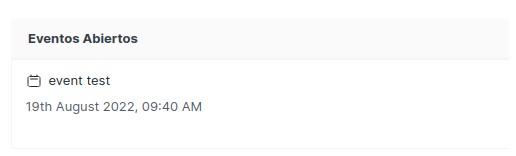
The expected output should be a full date format translation consistent with the language chosen. In this case, we could avoid the problem by removing the use of st/nd/rd/th abbreviations and getting the month translated, e.g.
19th August 2022 ==> (avoiding the suffix) 19 August 2022 ==> (fully translated into Spanish) 19 Agosto 2022
Module
CRM
Version
erpnext 14.0.0 frappe 14.2.0
Installation method
manual install
GitHub Labels
bug
Want to work on this?
Claim this issue to let others know you're working on it. You'll earn 10 points when you complete it!
Risk Flags
- date formatting
- language translation
Loading labels...
 GursheenK